INTRODUCTION
The FIWARE Tour Guide Application is a reference application aimed at teaching and demonstrating how to combine different Generic Enablers (GEs), in order to create a smart context-aware application. It exploits the capabilities offered by Docker Containers provided by GEris. Furthermore, the application allows an incremental instantiation and linkage of different FIWARE GEs, as it is based on docker compose.
The main functionality offered is the smart management of a big Restaurant franchise, including reservations, reviews and all the parameters which have to do with managing each restaurant on a day by day basis.
The implementation is being continuously updated and makes use of Node.js and HTML5 technologies.
APPLICATION FUNCTIONALITY
The list below summarizes some of the main functionalities currently offered by the smart restaurant application:
- Admit Customer reservations in accordance with current occupation and reservations made.
- Register customer reviews according to different criteria (service, food, etc.).
- Real-time control of different parameters at each restaurant location (occupation and temperature (at cuisine and at the dining room)).
- Short time historic data of the different parameters monitored.
- Publication of open data concerning the most relevant information about the different restaurant locations.
- Web user interface to monitor information about restaurants.
- Different user profiles (customer,restaurant manager, franchise manager) and functionalities per profile.
OVERALL ARCHITECTURE
The figure below describes the architecture of the Smart Restaurant application, which integrates a number of GEs:
IoT GEs:
- Backend Device Management - IDAS. It is in charge of connecting IoT devices (temperature & humidity) using the UL20 client. This component translates UL20 client requests into NGSI context entities, enabling querying and subscribing to sensor data.
Data GEs:
- Orion Context Broker. It is responsible for managing all the application context information modelled as NGSI entities (Restaurant, Reservation, Review, …).
- Cygnus, part of the Cosmos ecosystem, is responsible for persisting historical context data in a target backend (MySQL or Hadoop) or as open data (CKAN). Cygnus is connected to Orion Context Broker through the subscription/notification interface.
Security GEs:
- Authorization PDP - AuthZForce, provides an API to get authorization decisions based on authorization policies, and authorization requests from a PEP proxy.
- PEP Proxy - Wilma, is a proxy that will respond to every application request. Working together with AuthZForce and KeyRock, it protects application resources based on the AuthZForce PDP (policy decision point). As a result each user will only get access to the data she is authorized to, according to her profile.
- IDM KeyRock, covers a number of aspects involving user profile management, oauth authentication, authorization & trust management, Single Sign-On (SSO) to service domains and Identity Federation towards applications. It interacts with AuthZForce, in order to define the policies that the PEP Proxy will use to protect the application resources.
Through a front-end application, managers get access to restaurants under his duty and restaurant customers can make and browse reviews, or even ask for reservations.

Figure 1: Overall Tour Guide Application Architecture
IMPLEMENTATION
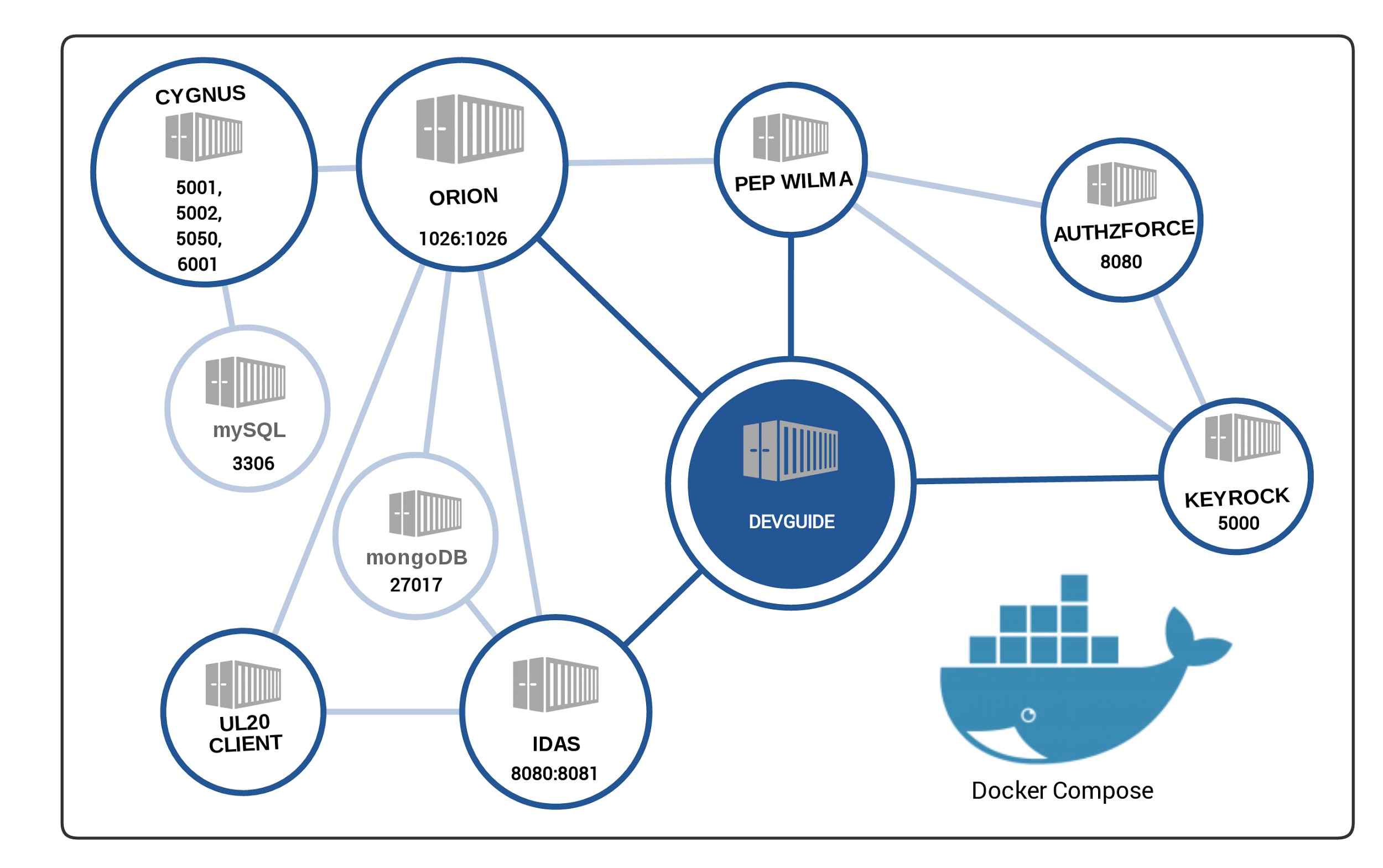
To this aim we have connected, using Docker-compose, six GEs deployed on different containers. Docker-compose enables the creation of a complete environment just by writing a .yml (or .yaml) schema file. In that file several parameters are defined: containers to be created, volumes to share data, how to link containers, ports exposed and environment variables that will be used to configure the Generic Enablers.
The docker-compose file created for the Developer’s Guide APP is available here and defines the scenario described by the image below. This configuration has all the advantages of using isolated environments and exposing each generic enabler from a desired port:
EXPERIMENTING
Download the repository, make sure you have Docker and Docker-compose installed and running, then execute the following command:
docker-compose -f docker/compose/docker-compose.yml up
Then, you need to add the container IP address to your hosts file to make it reachable. In order to simplify this process, the get-docker-hosts script will do this job (sudo required).
And everything will be up and running.
Once done, the user interface will be available at the host configured in the docker-compose, which is ‘devguide’ by default. So you just need to open it in your favourite browser:
http://devguide
However, if you only want to play with an individual GE, for example, Orion Context Broker, simply type:
docker-compose -f docker/compose/docker-compose.yml up orion
By following the same approach, you can also experiment with other GEris provided in the application. You can query the Context Broker to dump data, access Keyrock to manage users, roles and permissions, generate sensors using the provided scripts, consume the Authzforce API to check the policies or store/publish data in Hadoop or CKAN.
QUERYING CONTEXT DATA
For consuming the existing data in the Context Broker, there is a set of queries that you can test by your own. Within that queries you will be able to (among others):
- Get a restaurant
Query using NGSIv1:
curl -s -X GET -H "Accept: application/json" -H "Fiware-Service: devguide" -H "Content-Type: application/json" 'http://orion:1026/v1/contextEntities/Elizalde' | python -m json.tool
Query using NGSIv2:
curl -s -X GET -H "Accept: application/json" -H "fiware-service: devguide" -H "Content-Type: application/json" 'http://compose_orion_1:1026/v2/entities/Elizalde' | python -m json.tool
- Filter by attribute and geo-location
Query:
curl -s -X POST -H "Accept: application/json" -H "fiware-service: devguide" -H "Content-Type: application/json" -d '{
    "entities": [
        {
            "type": "Restaurant",
            "isPattern": "true",
            "id": ".*"
        }
    ],
    "restriction": {
        "scopes": [
            {
                "type": "FIWARE::Location",
                "value": {
                    "circle": {
                        "centerLatitude": "43.185335",
                        "centerLongitude": "-2.471404",
                        "radius": "20000"
                    }
                }
            },
            {
                "type": "FIWARE::StringQuery",
                "value": "priceRange<20"
            }
        ]
    }
}' 'http://orion:1026/v1/queryContext?details=on&limit=1'
- Generate subscriptions (in this particular case, for Cygnus)
Query:
curl -X POST -H "Accept: application/json" -H "fiware-service: devguide" -H "Content-Type: application/json" -d '{
    "entities": [
        {
            "type": "Restaurant",
            "isPattern": "true",
            "id": ".*"
        }
    ],
    "attributes": [ ],
    "reference": "http://cygnus:5050/notify",
    "duration": "P1M",
    "notifyConditions": [
        {
            "type": "ONCHANGE",
            "condValues": [
                "aggregateRating"
            ]
        }
    ]
}' 'http://orion:1026/v1/subscribeContext'
and more. Make sure you use the right host (by default ‘orion’ in the Tour Guide Application).
USERS, APPLICATIONS, ROLES AND PERMISSIONS
There is an initial users, organizations, roles and permissions added by default using the python-keystone client for Keyrock. The file is available in the repository and you can modify it according to your needs.
SENSORS DATA
Sensors by default are disabled as well as occupancy levels. To test it, modify the docker-compose.yml file setting the variables:
ORION_SUBSCRIPTIONS_ENABLED=true to generate the subscriptions
SENSORS_GENERATION_ENABLED=true to generate them
SENSORS_FORCED_UPDATE_ENABLED=true to update the values
And for the occupancy levels you can refer to a restaurant and/or time frame. Check the options by doing:
docker exec -i -t compose_devguide_1 node
fiware-devguide-app/server/feeders/occupancyupdater.js --help
It will update the occupancy levels from a restaurant at the time of execution.
DATA STORAGE: COSMOS (IoT) AND CKAN OPEN DATA
Also you can store data into Cosmos Instance (Hadoop HDFS) or publish it in CKAN.
For storing it in Cosmos you will need to modify the following file:
For Cosmos:
cygnusagent.sinks.hdfs-sink.hdfs_username =
cygnusagent.sinks.hdfs-sink.hdfs_password =
After the data is stored, you can perform data analysis using the tools provided.
For CKAN (demo.ckan.org):
cygnusagent.sinks.ckan-sink-XXXX.api_key=
And sensors data will be published under ‘devguideidas’ organization.
XACML SECURITY POLICIES
Finally, you can check the policies that Keyrock generates in Authzforce. For that, we first retrieve the domain where the policies are stored:
docker exec -i -t compose_authzforce_1 curl -s --request GET
http://localhost:8080/authzforce/domains | awk '/href/{print $NF}' | cut -d '"' -f2
And with the returned value, we retrieve the policy Set:
docker exec -i -t compose_authzforce_1 curl -s --request GET http://localhost:8080/authzforce/domains/$DOMAIN/pap/policySet | xmllint --format -
That will returns the XACML PolicySet generated by Keyrock.
The XACML PolicySet should contain a set of policies that the PEP Proxy will check to provide a decision (allow or deny) to a resource. Each policy contain a Role, and the role itself will contain the allowed permissions to each resource.
CONCLUSIONS AND NEXT STEPS
The FIWARE Tour Guide application, is a fast and generic way to have a functional environment for experimenting with the main FIWARE GEs.
We plan to add more functionalities, refine the HTML5 user interface and to deploy the application using the Docker infrastructure provided by the FIWARE Lab. Last but not least In the near future we will be integrating more GEs. Stay tuned by following our Github repository!